Zmodo All-in-One sPoE DIY Security Camera System Review

I’ve always been intrigued by those multi-camera home security systems that you see walking around Costco and Sam’s Club, so when I was asked to review a similar unit I took the opportunity. Here is my review of the Zmodo 4 Channel Complete sPoE NVR Surveillance System w/ 1TB HDD, done from the perspective of a mainstream consumer who wants an affordable, DIY-installed security camera setup at home. I will not be nitpicking camera specs or exploring hacking options.

Cost

My specific package model is ZP-KE1H04-S-1TB, which currently has a list price of $349.99 with free shipping on Amazon. Note that this package comes with a 1 TB hard drive pre-installed, whereas other Zmodo packages do not include a hard drive so that you can size it as you like. (There are many grouchy online reviewers who didn’t notice this fact.) This budget-friendly version has 4 channels (4 cameras recording at once), while more expensive models come with 8 channels or more.

What’s In The Box

zmodo1

  • 4-channel security NVR with a 1TB hard drive (ZP-NE14-S) with USB mouse
  • 4 720p bullet IP network cameras (ZP-IBH15-S)
  • 19V 3A power adapter, 3′ CAT5e network cable, two 50′ camera sPoE cables, two 80′ camera sPoE cables

What You Need To Supply Yourself

  • External display with VGA input and VGA cable.
  • A wireless router with one empty port (for remote viewing).
  • Always-on High-speed internet connection with minimum upload speed of >256kbps (for remote viewing).
  • Android (v.2.3 and up) or iOS (v.5 and up) mobile device (for smartphone app viewing)
  • Windows XP, Vista, or 7 + Internet Explorer 6 thru 11 (for desktop viewing).

Setup & Installation

If you buy this unit with the hard drive pre-installed, setting everything up is literally plug-and-play. (Of course, installing the hard drive just takes a screwdriver.) You simply connect everything according to the diagram below. Make sure everything is connected first and then turn on the unit, and the unit will automatically recognize the cameras and display them on your monitor. I was up and running (with the cameras on my coffee table) in under 10 minutes.
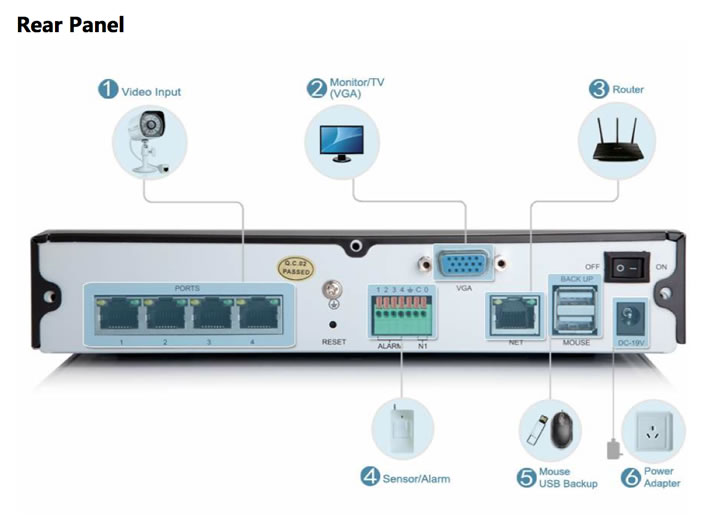
zmodo2

sPoE stands for simplified power over ethernet, which means that both power and video signal travel through one cable to the camera. You’ll still need to drill holes and such for cable installation, but you don’t need to route an additional power cord to every camera. Definitely easier, and many budget systems don’t have this feature. Included are two 50 ft cables and two 80 ft cables. If you need more, you can use standard Cat5 ethernet cable. The only hard part is deciding where to position your cameras and installing the cables, which for me required crawling through the attic. I am also simply pointing one out the window.

The NVR (network video recorder) is like a simplified computer with a hard drive, mouse, ethernet port, and monitor port. You view live streaming video on your connected monitor, desktop computer over internet, or smartphone app via internet. You can only view stored video when on your home network. You can make backup copies to a USB flash drive. The NVR must connect physically to your router via ethernet cable.

More Impressions

I personally barely met the minimum requirements as the only VGA-capable monitor I have currently is our living room HDTV bought in 2007. Also, I have no Windows computers either, so I am restricted to either viewing on my home’s only TV or via smartphone app. I wish they allowed more control via web browser.

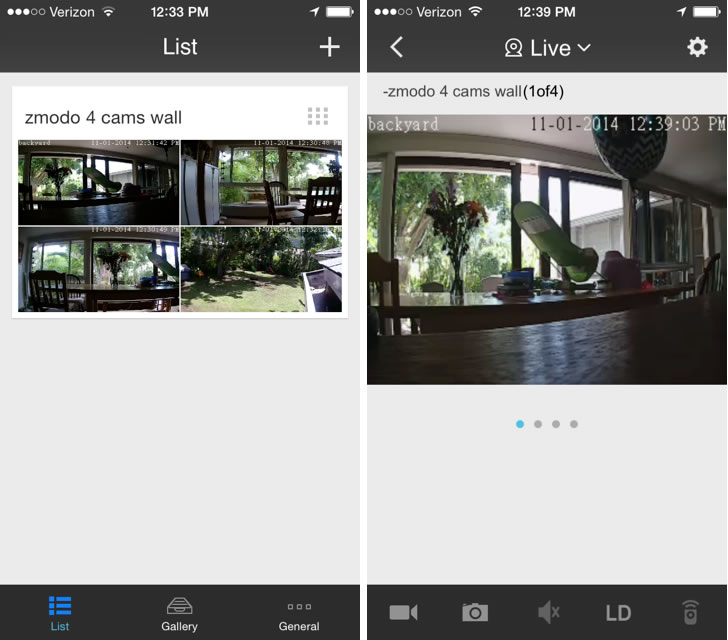
I primarily use their iPhone app, which thankfully works fine on work WiFi or cellular 3G/4G data. You can link up your app via a quick QR code scan, but if your smartphone is already on the same WiFi network it also finds your cams automatically. Both are simpler than the traditional method of setting up port forwarding. I can enable motion detector alerts via the app as well as through e-mail. The motion detection is rather sensitive, and you’ll get a lot of alerts if you aim it at windy trees. You can adjust the sensitivity on the main box, but not via app.

The 720p camera video quality is significantly better than my previous Samsung Smartcam indoor WiFi cameras. Daytime video has good colors and night video is crisp. Each camera as 24 infrared LEDs which improves illumination and are quite noticeable at night with a red glow (good for scaring off criminals?). Again, I can’t compare directly with other HD cams but the picture is more than satisfactory. You can also toggle between high and low definition streaming.
zmodo3

The IP cameras have an outdoor “weatherproof” casing that feels durable and high quality. They are IP-rated 65, which means it is dust-tight and can withstand low-pressure water jets from any direction. The box says the camera’s rated operating temperature is 14 F to 122 F so I’m not sure about extremely cold climates. You mount the cameras with screws, so the only real tool you need is a drill and screwdriver.

With a 1 TB hard drive, I can keep 30+ days of past footage from all 4 cameras using their “intelligent” setting which increases the video quality when motion is detected but maintains a lower quality when there is no motion detected. The recorded footage is marked with times of motion detection, so that you can go directly there without viewing the entire thing.

If you compare this with the popular Dropcam Pro, that only comes with one indoor camera and costs $200. Dropcam also has easy installation and live streaming to smartphone, but no storage option unless you pay at least $10 a month for cloud storage. The video data travels via WiFi, but you still need a power cable so that’s still one cable going to the camera. So the Dropcam offers cloud storage capability and easier portability, but this Zmodo package offers four indoor/outdoor cameras and 30 days of hard drive storage for no ongoing cost. I think the Zmodo is ideal for small business owners that want an affordable security option and the ability to review lots of past video, and also for homeowners who want permanent, outdoor surveillance and are willing to perform a DIY installation.

Pros

  • Quick setup and easier installation with power through ethernet cable.
  • Past 30+ days of video stored on included 1 TB hard drive.
  • Access live video feed from PC or smartphone.
  • Free in-app motion alerts.
  • Can connect with traditional alarm system.
  • Competitive pricing.
  • No ongoing monthly fees which add up to $100+ a year with other cameras.

Cons

  • Doesn’t interact with other home automation protocols.
  • Can’t remotely reposition cameras.
  • No Mac OS X support (iOS app available).
  • No cloud storage option.

I received this unit for free to review with no editorial restrictions and no other compensation. All opinions expressed are my own. You can interact with Zmodo and enter periodic contests via their Facebook page.

Amazon Fire Streaming Stick 50% Off with Prime

fire_stickOffer expired, now $39. Many cable TV “cord-cutters” get their TV fix using an HDTV over-the-air antenna and/or a streaming video device like the Roku, Google Chromecast, or Apple TV. Amazon has just announced their new Amazon Fire TV Stick. The regular price is $39, but if you have Amazon Prime and order it by 10/29/14 at 6am Pacific, you can get it for just $19. Here’s a comparison chart against similar competitors provided by Amazon (click to enlarge):

fire_compare2

Notably, Google Chromecast does not support Amazon Prime Instant Video and does not include a physical remote. Fire does not support HBO Go.

Not a Prime member? Join as Amazon Mom for a free 1-month Prime trial and get 50% off diapers. Join as Amazon Student with a .edu email address and get a free 6-month Prime trial.

I have an older Roku box that I’ve been using on and off for the last couple of years – it is useful for Plex which streams my own media from my hard drive to my TV and also for various kids shows on-demand from Amazon Prime Instant Video. (I cancelled my Netflix subscription after having kids since I don’t have time to binge-watch TV anymore.) So why am I going to buy this? Because my 2-year-old lost/hid/ingested the remote, and this new gadget is cheaper than buying a replacement Roku remote!

Which SUV, Minivan, or Crossover Is The Most Space-Efficient?

siennaIn the October 2014 issue of Car and Driver magazine, they have an article “Space Exploration” comparing the space-efficiency of “hatchbacked” vehicles – hatchbacks, wagons, crossovers, SUVs, vans. Their definition of space efficiency was carrying capacity compared to the amount of ground a vehicle occupies. Specifically, the maximum seats-down cargo volume divided by footprint (length times width). Trucks don’t count.

I can’t find a version of the chart online, so here is my rundown of the findings:

  • The most space-efficient vehicles were cargo vans usually bought for commercial use. Not surprising, as these are often seen as airport shuttles. Examples are the Ram Promaster, Mercedez-Benz Sprinter, and Ford Transit. The extended body, high roof versions of these vans have ratios as high as 3.69.
  • After that, the minivans rule: Toyota Sienna 1.38, Honda Odyssey 1.33, Chrysler Town & Country 1.30. (Nissan Quest was only 1.00.)
  • Huge SUVs are next: GMC Acadia 1.06, Ford Expedition 1.08, Toyota Sequoia 1.06.
  • After that, things get more interesting. The Scion xB is 0.86 is actually a bit better than the Toyota Highlander at 0.83 and the Mercedes GL at 0.79. The Honda Fit is 0.71, on par with the Jeep Grand Cherokee at 0.68 and Audi Q7 at 0.67. Relatively disappointing small cars include the Nissan Juke 0.46, Ford C-Max 0.49, and Kia Sportage 0.62.
  • Want electric? The Mitsubishi i-MiEV is 0.80 while the Nissan Leaf is 0.35 and Chevrolet Volt is a paltry 0.12. I would note the MiEV is tiny though, it looks like a golf cart driving down the road.

As you might expect, in general tall and boxy shapes make for high numbers. Space-efficiency isn’t everything, but it can be an important factor to consider if you have a growing family or certain hobbies. It would have been nice if they also used the alternative definition to be cargo volume divided by base retail price (space per dollar).

Infographic Map: Cell Phone Taxes By State

The nonpartisan Tax Foundation has released a new report on Wireless Taxation in the United States 2014. The average US wireless consumer pays 17% in combined federal, state, and local taxes and fees. Folks in Chicago, Baltimore, Omaha, and New York City have combined tax rates over 25 percent! Here’s their state-by-state map breakdown:

celltaxmap720

They also point out that these effective tax rates are much higher than normal sales tax.

Actionable advice? If your area is subject to high cell phone taxes, it may be better to switch to a prepaid plan rather than the traditional postpaid. I’m not sure exactly how these work, but somehow the taxes are averaged out and baked into the flat price. Note that depending on your area, you may still be subject to a e911 fee and sales tax. You can often bring your own off-contract phone and save even more. Most discount providers now accept phones like the iPhone and Galaxy.

I’ve heard of some people fudging their billing addresses to stay in a low cell tax state, but that may be more expensive or trouble than it is worth.

More Research on Buying Experiences vs. Things

travelsignpostYou’ve probably heard the advice that you should buy experiences and not things. (Except maybe when things help you experience.) This Atlantic article explores new findings from behavioral research about the differences between experiences and material objects.

With experiences, people are less competitive and worry less about keeping up with the Jones’:

Gilovich’s prior work has shown that experiences tend to make people happier because they are less likely to measure the value of their experiences by comparing them to those of others. For example, Gilbert and company note in their new paper, many people are unsure if they would rather have a high salary that is lower than that of their peers, or a lower salary that is higher than that of their peers. With an experiential good like vacation, that dilemma doesn’t hold. Would you rather have two weeks of vacation when your peers only get one? Or four weeks when your peers get eight? People choose four weeks with little hesitation.

Experiences elicit positive feelings and promote social togetherness rather than creating impatience and worries about scarcity.

Those waiting for experiences were in better moods than those waiting for material goods. “You read these stories about people rioting, pepper-spraying, treating each other badly when they have to wait,” he said. It turns out, those sorts of stories are much more likely to occur when people are waiting to acquire a possession than an experience. When people are waiting to get concert tickets or in line at a new food truck, their moods tend to be much more positive. […]

Research has also found that people tend to be more generous to others when they’ve just thought about an experiential purchase as opposed to a material purchase. They’re also more likely to pursue social activities.

Baby Gear Reviews: Diaper Pails (Part 4)

diaperpailsHere is Part 4 of my series on baby gear, organized in the order of Amazon’s Baby Registry. The entire multi-part series can be found with the Baby Gear tag here. This time I’ll talk about our experiences with diaper pails.

Gotta put the poop somewhere, right? I’ll focus on diaper pails for disposable diapers. Most of them have some sort of mechanism to help prevent stinky odors from escaping the poop bucket. We got a Diaper Genie Elite from our baby registry, which was one of the two recommended by the Baby Bargains book. (The other was the Dekor.)

It works more or less, but like with razors and printers, the bag refills are where they make their profits. Each refill canister is really only 3-4 bags of diapers and they cost $6-$8 each. So essentially you’re paying upwards of $2 for a plastic bag! Compare this with under 10 cents for a kitchen trash bag from Costco. Also, the advertised “count” refers to an imaginary pile of newborn diapers that are vacuum sealed or something because I’ve never fit that many.

Parents have come up a number of ways to frugalize the diaper pail:

  • Wrap up your diapers as tightly as possible.
  • Throw the pee diapers in the regular trash and only the poops in the diaper pail.
  • Don’t waste too much bag when cutting and tying. Make sure you squeeze all the excess air out. Some use scissors instead of the provided cutter. I used to use those wire twist ties from other bags.
  • Use a plain kitchen trash bag wrapped around an empty refill canister. Note that it won’t fit perfectly and we got mixed results.
  • Buy generic refills. Note that Diaper Genie changed their design so they might not fit right anymore on new models. Check it out. Rather lame attempt at keeping their monopoly, in my opinion.
  • When your Diaper Genie bag is full, place a regular trash bag underneath and cut only the bottom knot. Let the diapers all fall into your 10 cent kitchen trash bag and throw that away. If you keep your wrapped diapers clean your refill liners can last 5 times longer or more.

We experimented all these things (with my prodding). In the end, my wife didn’t want to deal with any added hassles and we just buy the overpriced refills at Sam’s Club. I personally throw all the non-stinky diapers that I change straight in the regular the garbage.

  • Verdict: Considering you only fit around 50 diapers max at $2 a bag, that’s 4 cents a diaper which is an additional 20% of the cost of the diaper itself. In the end, you either think the reduced odor and convenience is worth the extra cost (my wife) or think you should just throw your diapers in a regular trash pail and wrap up the stinky poops in an extra plastic bag (me). For what you’ll be paying in refills you could buy a really nice trash can that will last for a long time.

Eat Anything You Want, Just Cook It Yourself

Want to learn how to eat well without the need for fad diets or deprivation? This short video narrated by Michael Pollan does a nice job of explaining his simple “just cook” rule:

Found via Farnam Street. Also see my book review of The Omnivore’s Dilemma. Some other thought-provoking videos on the same RSA channel as well.

It’s now been nearly a month of cooking mostly at home from scratch. With proper planning, the cooking hasn’t been too overwhelming and we are definitely spending less money on food. But I must admit I haven’t lost much weight. The food is so good and new and interesting… I’m eating too much! Hopefully I’ll adapt and perhaps I’m getting healthier in other ways (less salt, preservatives, binders, fillers, etc).

Backup Hard Drives: Expect Failure and Plan Accordingly

In the past month, both of my Western Digital 1 TB external backup hard drives have failed on me. This was pretty disconcerting considering I bought two of them specifically so they could be redundant backups. I was a bit lazy and barely had enough time to transfer my data while the last drive was limping along.

I turns out there isn’t that much data on real-world hard drive failure rates. When searching, many reference this post by online backup site BackBlaze which has owned over 25,000 hard drives (also see their recent update). In both posts, Seagate drives had much higher failure rates than Hitachi or Western Digital. However, other tech experts point out the flaws in drawing that conclusion. Brands don’t matter as much when they keep merging with each other anyway.

Really, the only conclusions I would confidently draw are (1) don’t buy specific “low power consumption” models of Seagate hard drives and (2) expect hard drives to fail on you. Imagine how little can go wrong in order to fit 4 terabytes of information on a little spinning disk. This Backblaze post is the one you should actually read. It cites other studies that say hard drives fail much more often than the MTBF (Mean Time Between Failures) statistics put out by manufacturers, and it is hard to predict impending failures even with regular hard drive checks. Here is a chart showing that hard drives tend to fail either within the first year, or after 3 years.

hdfail_bb2

Here is a chart of survival rates over time.

hdfail_bb

That’s roughly 1 in 5 drives failing within 4 years, and maybe half will fail within 6 years. That starts to make a service like Crashplan at $60 a year more palatable.

In the end, Backblaze still buys Seagate drives because their cheaper price more than offsets any expected unreliability. Perhaps that is what consumers should do as well. Forget brands, buy whatever is cheapest, keep redundant backups in expectation of failure, and save your receipts. Of course, hard drive warranties keep getting shorter and are now usually only a year long (perhaps an admission of their unreliability?). Here’s my plan:

  • Purchase with an American Express that offers their Extended Warranty which will double the manufacturer’s warranty, up to one year.
  • Purchase from Costco whatever is on sale, due to their generous return policy. While even 90 days is relatively good, but I also do not see hard drives included explicitly in their 90-day electronics return policy – “We guarantee your satisfaction on every product we sell with a full refund. The following must be returned within 90 days of purchase for a refund: televisions, projectors, computers, cameras, camcorders, touchscreen tablets, MP3 players and cellular phones.” Do accessories count?
  • Keep my important documents and family pictures on multiple formats (cloud, flash drives, multiple hard drives).

Feel Like You’re Always Eating Out? You’re Not Alone.

Here are some charts illustrating a couple of interesting food trends in the US.

Americans are spending a smaller percentage of their income on food than ever. From America’s Shrinking Grocery Bill:

In 1984, the average U.S. household spent 16.8 percent of its annual post-tax income on food. By 2011, Americans spent only 11.2 percent. The U.S. devotes less of its income to food than any other country—half as much as households in France and one-fourth of those in India.

shrinking700

But you see that big orange slice of the chart?

We are also spending a larger percentage of our food budget on food prepared away from home than ever. From Cheap Eats: How America Spends Money on Food:

foodathome

Looking at the chart, it seems like only a matter of time before we eat out more often than we eat in.

Our peak period of eating out was after the birth of our first child. It felt like we were whipping out the binder of take-out menus nearly every day. More recently, we completed the Dinner Boot Camp which contained a week-long plan for easy home dinners, and since then we’re on our 4th consecutive week of cooking dinner (and the following day’s lunch) at home at least 5 times a week. It’ll be hard to keep up, but doing a bit of planning before every week really does go a long way.

Baby Gear Reviews: Baby Bottles and Accessories (Part 3)

azbottlesHere is Part 3 of my series on baby gear, organized in the order of Amazon’s Baby Registry. The entire multi-part series can be found with the Baby Gear tag here. This time I’ll talk about our experiences with baby bottles.

Our first baby was colicky and not a great eater, and that is really where these bottle companies make their money. Design a bottle nipple that reduces the unstoppable crying of colic, and we’ll gladly pay upwards of $6 per bottle. Heck, if it really worked I’d pay $50 a bottle without blinking an eye. The basic idea is that air is being swallowed when air backflows into the nipple during drinking, which supposedly causes colic. So the fancier bottles all have some mechanism to alleviate that vacuum.

Our babies were breastfed, so we got a “free” Medela breast pump (it was covered by our health insurance). Thus, we started out with a few Medela brand bottles. Baby didn’t like it. Between purchasing and borrowing from friends, we ended up trying most of the brands: Medela, Born Free, Playtex, Tommee Tippee, AVENT, and Dr. Browns Natural Flow. We tried the last three because they were the most recommended by the Baby Bargains book.

The two that ended up working best for us were:

tippee

  • Tommee Tippee – The silicone nipple does look most like a human nipple with a wide base, the construction felt of high quality, and the wider bottle was easier to hold in my palm. Keep the air vent hole facing upwards so milk doesn’t block it. On the expensive side.
  • Playtex Drop-Ins with the Latex Nipple – I bought this when desperate in a drugstore after reading a recommendation from a parenting forum. Latex is softer than silicone and thus feel more natural, although silicone is more durable and some babies are allergic to latex. The collapsible liners are convenient and eliminate vacuum but are not eco-friendly. Really, it was all about the soft latex nipple.

All bottles sold today should be BPA-free, I would check if you are using hand-me-downs. I would also note that you can buy nipples with different-sized holes that change the flowrate, your baby may prefer one to another and that could make a big difference in itself.

Other things to buy. As for accessories, a simple dishwasher basket was a very good buy; we’ve used it daily for 2 years now for all kinds of small kiddie things, even after we stopped using bottles. A good bottle brush is also helpful for thorough cleaning.

Other things we didn’t buy. We did not buy any bottle sterilizers or bottle warmers. When we had our first child, I think the first two weeks we boiled water and manually sterilized the bottles every time. What a pain. After that, we only sterilize them before the first use. Now we just wash them with warm, soapy water or use the dishwasher and rinse them well. Hot tap water works fine for warming milk or formula. When eating out, we simply ask for some hot water like they would serve for tea. If you formula-feed, the advice is to start them at room temperature and your baby will be fine with it. Our pediatrician agreed these were unnecessary. Perhaps they are wonderful inventions, but I don’t feel like I’ve missed out.

  • Verdict: There are endless combinations of nipple shapes and bottle designs. I’m sure some babies will drink from anything. For us, there really wasn’t a huge difference between any of the bottles, but I listed our two favorites above. If possible, try to borrow different bottle brands from friends to try out.

Google Hangouts App Update: Free Voice Calls Over Data for Android and iPhone

hangoutsGoogle has just announced better integration between Google Voice and their Google Hangouts smartphone app. Both iOS and Android apps can now make domestic and international calls through a Wi-Fi or data connection (like 4G). You can also receive calls if you have a Google Voice number. Calls to the U.S. and Canada are currently provided by Google free of charge from all countries where Hangouts calling is available.

What does this mean exactly?

  • For the frugal minimalist, as long as you have a data connection like WiFi, you can now make and receive unlimited domestic voice calls using a basic Apple or Android device. You can pay for a cheap prepaid option as a backup, or simply go without any cellular plan. You can also use voice over data to complement T-Mobile’s $30 plan which offers 5 GB of 4G data but only 100 voice minutes (this plan isn’t heavily-advertised, but scroll down and you’ll find it).
  • For the international traveler, as long as you have WiFi in a supported country you can call back home to the US for free using your phone. No foreign SIM card or even Skype account required.
  • For the international caller, you can more easily use Google Voice’s discounted calling rates which have recently been lowered again. For example, rates to India (mobile or landline) and Mexico (landline) are only 1 cent a minute.

iPhone / Apple iOS. Download the Google Hangouts app and the calling functionality is built-in.

Android. Download both the Google Hangouts app and the Hangouts Dialer app. If you need help, here are directions straight from Google: Make calls with Hangouts on Android.

SMS text message support is also supposedly coming, first to Android devices “in the next few days” and then to iOS devices “soon”.

Get Rid of Second Car and Use Uber Instead?

uberiphone5Forget borrowing money to buy a car, the concept of owning a car itself is changing. Owning a car requires committing to a long list of expenses:

  • car payment and value depreciation ($1,000+ a year)
  • car insurance premium ($500+ a year)
  • fuel costs ($600+ a year)
  • government tax, registration, and fees ($300+ a year)
  • maintenance and repair costs
  • parking, traffic tickets, and tolls

In rough terms, owning a car runs at least $3,000 a year with most people spending more than $5,000 a year. Consumer Reports calculates the median at $9,000 a year over the first 5 years for new car buyers.

As a couple with two cars, I’ve been thinking about trying to get by with one car in the household. Even besides public transit, consider all the car-based options that may be available:

  • Renting a car, but driving ourselves. (ZipCar, RelayRides)
  • Being driven around by other people who rent or own cars. (taxis, Uber, Lyft)
  • Being driven by autonomous robotic cars. (Google or major auto company)

After recent positive experiences with Uber and reading about the advancements in self-driving cars, I now believe that within the next 10 years we will shed at least one car. (I doubt I would want to go completely carless with two kids and all their activities.) Some food for thought on the subject:

  • With Uber, Less Reason to Own a Car – Farhad Manjoo at NY Times.

    “In many cities and even suburbs, it’s becoming much easier to organize your life car-free or car-lite,” said David A. King, an assistant professor of urban planning at Columbia University who studies technology and transportation. By car-lite, Dr. King means that instead of having one car for every driver, households can increasingly get by with owning just a single vehicle, thanks in part to tech-enabled services like Uber.

  • A Financial Model Comparing Car Ownership with UberX (Los Angeles) – Kyle Hill at Medium.

    So there you have it… for the average American who drives 13,476 miles per year, owning a motor vehicle will cost them $12,744 per year to maintain, and the cost of taking UberX everywhere will cost them $18,115 per year. However, Americans who drive less than 9,481 miles in a year should seriously consider ditching their car, because UberX will be cheaper.

  • How Do Car Ownership Costs Compare to Uber? – Uber Blog.

    The math doesn’t lie. In a city with with a fast, practical (and cool) alternative like Uber, it would very much be worth your time to crunch the numbers and see how much you’re really spending on your gas, parking, maintenance, etc. and how much time you spend doing those things. Because having your own personal driver pick you up in a slick car each and every day is a hell of an appealing alternative.

  • Uber vs Car Ownership – Sam Altman.

    Taking uberX everywhere is now cheaper for me than owning a car (I have an expensive car, so it’s not a super fair comparison, but I still think it’s interesting).

Of course “the math” depends on where you live and how you drive, but even small to medium cities will be affected. Uber now has UberFamily (car seats) and UberPool (multiple passengers heading the same direction). Now look at self-driving car technology. If I buy a self-driving car, that’s really just another convenience/luxury that costs me more money. But what happens when Uber and Lyft don’t have to pay drivers? (Robots taking jobs again!) Fares will drop even further.