Thinking Of Switching To A Smaller Car To Save On Gas?

With the arrival of summer and gas prices at around $4 a gallon, the water cooler conversation has turned again to fuel efficiency. One important thing to remember is that the MPG number is not directly proportional to how much money you’re paying for gas. The chart below shows the annual cost of gas varies with the miles-per-gallon rating. Assumptions are 12,000 miles driven a year at $4/gallon.

Going from a medium-sized SUV that gets 20 mpg (Ford Explorer, Nissan Xterra) to a compact car that gets 30 mpg (Honda Civic, Ford Focus) will save you $800 a year. That is more money than going from the compact car to a hybrid like a Toyota Prius that gets 50 mpg combined, which would save you $640 a year.

Now, if you are driving a full-size truck that gets 15 mpg, just going from 15 to 20 mpg would also save you $800 a year. So we see that going from 15 to 20, 20 to 30, and 30 to 60 mpg are each about the same size “step” in terms of annual savings. For heavy drivers, each such step would be nearly $1,000 a year in gas, and that’s assuming gas prices don’t keep increasing! Look up your car’s numbers at FuelEconomy.gov.

So while making the jump to 50 mpg would still save you the most gas, the Prius still costs more money than a similarly-sized compact car like a Honda Fit. One piece of good news I read recently was from Scott Burns at AssetBuilder that his Prius batteries have lasted 100,000 miles and 8 years with no need for replacement. If you get good at buying and selling used cars on Craigslist, you could conceivably make the swap to a more fuel-efficient car relatively painlessly.

Reader Poll: Do You Still Have a Landline Telephone?

A recent government study found that over 25% of Americans now rely solely on a cellular phone for calls. In some states, over a third of people were wireless-only. This is a growing trend, and I wonder if you readers are any different?

What Is Your Phone Situation?

View Results

Loading ... Loading ...
If you don’t see the poll above, you may be viewing the RSS feed and should click and visit the actual blog website.

Factors that increased the likelihood of being wireless-only were having a lower-income, being younger, and renting. It’s suggested that being poor means you’re more likely to cut landlines as an extra expense, while being young means you may simply never have had a landline. Finally, both prepaid basic plans and packaged plans offering unlimited minutes have become cheaper and widely available.

One major factor stated for keeping a landline is for reliable emergency usage. Other possible reasons that come to mind are that you make a lot of calls, better clarity, or you wish to minimize radiation exposure. I solve those problems with my significantly cheaper VoIP phone service.

DIY Dining Table from Reclaimed Building Materials – Recycled Basketball Court Flooring

Ever since I stopped moving every year, I’ve wanted to get a big dining table, something that could fit at least 8 people. Finding one big enough at a retail furniture store was difficult, and when I did find it they were really expensive. While working on our house, we discovered home improvement stores that stores that sell reclaimed or recycled building materials. There are many local non-profits that do this, but one national “chain” is the Habitat for Humanity ReStore, which accepts material donations to fund their charitable home-building goals.

I was exploring one of these stores when I came across a 8 ft x 3.5 ft sheet of what look like reclaimed hardwood flooring. Upon closer inspection, it was actually pieces of the flooring from an old high school basketball court. The underlayment was still attached, and it was pretty sturdy. A handmade sign suggested making a table out of it. How cool is that?

The store had already recycled a piece for themselves. After some sanding and adding a border with reclaimed 2x4s, here’s what it looked like:

It cost us $60 plus $20 in reclaimed wood for the border, legs, and apron. Now to borrow some power tools and learn some carpentry…

AutoSlash.com Review: My Car Rental Experience

I just got back from my trip to Orlando, where I tried the new car rental website AutoSlash.com to book, and previously wrote an introductory summary of their features. To briefly recap, the website takes advantage of a unique feature of car rental reservations to continuously check for lower prices over time and re-book you whenever there is a price drop.
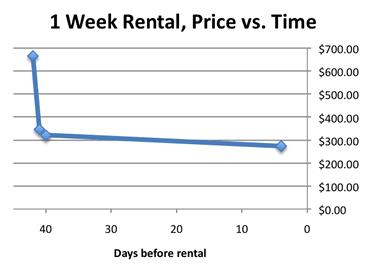
Here is the price history of my one week rental of a mid-size car in April 2011 from Orlando International Airport (MCO). I later realized it included Good Friday and Easter weekend, which I think increased the demand of cars.

  • Day 1 – $665.61 including all taxes and fees, with Payless. This was really the lowest price I could find at the time across Kayak, Expedia, etc.
  • Day 2 – $346.18 with Dollar Rent A Car at .
  • Day 3 – $320.41 again with Dollar.
  • Day 38 – $273.68, final price with Dollar.

As you can see, there was a flurry of activity in the beginning, nothing for a long time, and then finally one last price drop at the end. This is only a theory, but I think that the folks behind Autoslash do a price search for a week or so after your rental reservation is first made, and again a week or so before your actual rental date. Or perhaps this is just a result of how the rental agencies vary their prices over time.

Regardless, I was really happy with my experience, and will use them again in the future. They found a better price than I could have found, with really zero effort on my part. Many of these rental agencies are clones of each other anyway. I picked up my car from Dollar with no issues with my special coupon code, and drove away in a huge Ford Crown Victoria with 9 miles on the odometer since that’s all they had left. I declined all additional insurance coverages from them, and returned it with no problems. This last part is more of a testament to that specific Dollar franchise, but it increases my confidence with places that aren’t Avis or Hertz.

Life Planning Exercise: Creating My Perfect Day

I am currently reading The Art of Non-Conformity by Chris Guillebeau (review coming shortly). In one of the early chapters, he talks about an exercise where you write out how your perfect, idealized day would go in great detail, hour-by-hour. I’ve read about this method other places, but never actually write it down. As I go into it, I found myself getting really into it and making several changes throughout today. Here goes:

Early Morning
I wake up, naturally, after 8 hours of sleep. Many people don’t need that much sleep, but I do. I love waking up naturally, but will set an alarm as a backup, because… I have to wake up the kid(s) and get them ready for school. I still don’t have kids, but I really want them.

I make their lunch, and perhaps drop them off at school in my 10-year old Honda if it’s close enough. I take the dogs for a walk in the neighborhood park. I then do my exercise for the day. Most days it will be something active and fun, like swimming, bicycling, tennis, or running. To mix it up, sometimes with a buddy or group. Swimming in open water is fun, since I live by the ocean.

Morning to Early Afternoon
I shower and change into shorts and a t-shirt. I work at home and live in a temperate climate, so that’s what I wear every day. At the computer, I check the morning’s e-mails and do some work. Work consists primarily of reading books and online articles from thoughtful authors (not 24/7 cable news or superficial fluff), and then researching and writing on topics like personal finance, nutrition, web design, or graphic design. I actually only do specific jobs for clients occasionally, because I’m tired of dealing with customers. Writing is so much less stressful. I might also run a small e-commerce website, but nothing that requires constant attention. Part of the year, I teach something small at a local community college.

I only work 4 hours a day. I can do this because I’m smart with money and have saved up a big chunk. Mrs. MMB works half-time as well, still 9-5 downtown, but only 2-3 days a week. With a relatively simple lifestyle, our income still pays the bills with a little left over. Our portfolio is left to grow for “advanced” retirement once the kids are in college and Mrs. MMB quits completely around age 50. I feel like I’ll be doing something that earns income until at least 60.

Afternoon
I work until a late lunchtime, and then I take the dogs for another walk. If Mrs. MMB’s not working that day, we do this together. She loves to garden and much of our food comes from there. Some days, we walk to a local eatery with the dogs and dine al fresco.

I wait for the kids to come home from school or pick them up. We ate some snacks, then I help them with their homework. Next up: sports, 4-H, girl/boy scouts, or science club or whatever fills up the afternoon. I love being able to spend time with them. We shop every day at a local market for ingredients for that night’s dinner, before the after-work rush. Did I mention I never have to go to Costco or any megastores on the weekend?

Evening
Dinner is a family affair. Once a week, the grandparents come over for dinner or we go over to their place, since we live in the same city. After dinner and homework is finished, perhaps a DVD or pre-planned TV viewing. I could say “NO TV!!!”, and I’d still like to severely limit TV viewing in the house, but do think there is good content out there. Why not watch it together? Otherwise, we might play a board game or learn about that year’s Big Adventure. I am not a fan of video games at all, unless educational and done well.

I used to worry that once I had kids, I wouldn’t be able to travel anymore. However, I’ve been learning about parents who take their kids traveling around the globe for a year or longer. I don’t think that’s my style. I’d rather visit one single country/region for an entire month during the summer. I call it Big Adventure. Renting a house or apartment for the entire month would be more economical, and we could use that house as a base. During the rest of the year, we could research the country’s language and culture to plan out activities.

After the kids go to bed, I’ll probably be exhausted as well. If not, I’m sure I’ll poke around the internet some more before I pass out.

How would your perfect day go?

The Joys of Making Your Own Popcorn

I try to keep my life simple, but don’t see myself as a serious frugal person. I don’t make my own soap, and I eat out a lot. But one thing I recently fell in love with was making my own popcorn. It sounds so obvious, but it never really sunk in that I could make a huge bowl of kettle corn in 5 minutes and $0.50 in materials. To think, I was buying the stuff from the local farmer’s market for five bucks a bag!

Basic Directions

Heat 1-3 tablespoons of any cooking oil on medium high to high and add a single kernel of popcorn in a large, heavy covered pan. I use a wok-shaped stir-fry pan like this one. After you hear the first kernel pop (the oil is now hot enough), pour in 1/3 to 1/2 cup of popcorn (or enough to cover bottom of pan, no more than 1 kernel deep); re-cover. Shake constantly until all kernels are popped.

Plain Popcorn Tips
Adding salt is classic, but fine salt like popcorn or pickling salt sticks the best. Seasoned salt works too. For a gourmet taste and impressing folks, get some truffle salt. Delicious! I sometimes spray some Pam to have it adhere even better.

I’m not a huge fan, so have never made buttered popcorn. I’m sure you could just melt some butter and pour it over. I’ve also seen special popcorn oil with “butter flavor”, whatever that is. There’s also butter-flavored sprays and popcorn toppers.

Cheese Popcorn
I like these Kernel’s Seasons line of popcorn toppings. White cheddar and nacho cheddar are good. They are really fine so you don’t need to use much, and they are low in calories (6 cal per 1/2 tsp, which is how much I use at once).

Kettle Corn
For every 1/2 cup of popcorn, add in 1/4 cup of plain white granulated sugar. The sugar will dissolve, and after adding some salt you’ll end up with the great salty-sweet taste of kettle corn! Did you know that most microwave versions of “kettle corn” don’t use real sugar because it burns?

Caramel Corn
Instead of plain white sugar above, use brown sugar. The molasses will make it taste amazingly like caramel corn. It takes some practice not to burn the sugar by tweaking the heat level. If you love the “Chicago mix” flavor combination like me, now you can make it yourself by making this and a batch of cheddar cheese popcorn.

Cost Breakdown

First are the retail prices in my area, per Safeway.com. A 30 oz. bottle of unpopped Orville Orville Redenbacher costs $7. A 3-pack of 3.3 oz (10 oz. total) microwave popcorn bags of the same brand costs $3.50. This means each microwave bag and costs $1.16, while the same amount (~5 tbsp) of plain kernels costs $0.56. Adding oil and sugar is another ~5 cents. If you went out and bought bulk popcorn you can get it for $1 per pound, making each serving about 15 cents.

Honestly, I can’t imagine going back to using the microwave, besides the ability to make it at an office or dorm room. I actually burn popcorn less when cooking it manually. Pre-packaged microwave popcorn also comes with preservatives, usually TBHQ. GetRichSlowly offers some tips on DIY microwave popcorn, but I say just use a pan. I do like the idea of not using any oil with a hot air popper, but that’s just one more kitchen appliance I don’t want to deal with.

All I can say is, if you like popcorn, try it!

Ignite Video: Tips For Buying A New Car

Here is a 5-minute, 20-slide talk from a 2007 Ignite conference in which John Gruhl shares his tips on buying a new car from a dealer. It’s gotten over 250,000 views on YouTube, and includes a lot of the same tips you may have heard before but in a slightly difference package.

Here are the major bullet points to recap:

  1. Obtain financing separately (I would add, or pay cash!)
  2. Set aside two full weekends for buying a car.
  3. Get competitive bids from several dealers.
  4. Walk away if the deal changes.
  5. Don’t buy any extras.

Poll: How Big Is Your Emergency Fund?

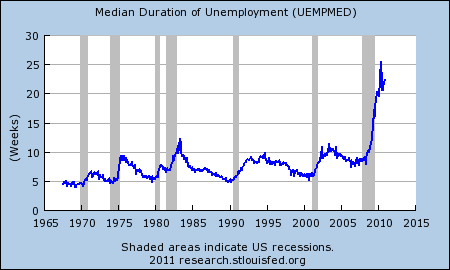
Below is a chart of the median duration of unemployment from July 1967 to December 2010, based on data supplied by the US Department of Labor. Things are bad out there, and remember, this is just the median!

According to this December 2010 report from the Bureau of Labor Statistics, out of the 9.4% unemployment rate, 44.3% of them are considered long-term unemployed (those jobless for 27 weeks or more). That means over 4% of the total US workforce – 6.4 million people – has been unemployed for over 6 months.

Which leads to the poll question of the week. How prepared are you for an extended period without a paycheck? In this case, by emergency fund I am talking about a cash (or similar) cushion that is accessible, not lines of credit.

How Big Is Your Emergency Fund?

View Results

Loading ... Loading ...
If you don’t see the poll above, you may be viewing the RSS feed and should click and visit the actual blog website.

Peer-to-Peer Renting: Lease Your Stuff to Strangers, Hopefully Buy Less Stuff

Recent articles in the New York Times and BusinessWeek magazine talked about the growing emergence of websites where individuals can rent out their belonging to other strangers, coining the new term “collaborative consumption”. I like the idea. Not only can you make some extra money renting out your stuff when you aren’t using it, but as a borrower that means you need to buy less stuff as well. In addition, people can use it as a “test-drive” to try out things like a certain model car or an iPad. Here’s a list of websites in this area, please let me know any that I’ve missed.

RelayRides
Peer-to-peer car rentals! Rent your car to strangers by the hour. Started in Boston and now available in San Francisco Bay Area as well. Free to join, and renters start with $25 free driving credit. Prices are cheaper than competitors like ZipCar, which owns their own private fleet. Claims that owners can make $250 a month on average renting out their vehicles. Rates include gas and insurance.

Similar: Spride Share (currently in SF Bay Area), WhipCar (UK),

Airbnb
Rent out extra rooms in your house (or the entire house, a castle, or private island…). Free to sign up. Set your own prices and availability. Airbnb facilitates all bookings and financial transactions. They already have over 50,000 properties in 10,000 cities.

Similar: ParkatmyHouse (rent out driveway or garage space in crowded areas)

Zilok
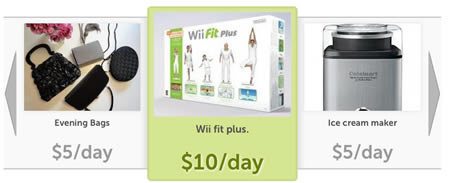
Technically you can rent out anything on this site, but it has specific categories for cars, vacation sites, power tools, and event rentals. You can rent from businesses or individuals. Looks like a PS3 is going for $20-$25 a day.

Similar: SnapGoods (newer, but more polished website), Rentalic

Share Some Sugar
Can I borrow a cup of sugar? You can also rent out anything on this site, but SSS seems to promote borrowing between people in the same neighborhood for free (with a refundable security deposit). After browsing a bit, I realize that I could use a lawn aerator, if only there was someone nearby with one available.

Similar: ShareZen (more for collaborative ownership of a plane, home, or boat), Skyara (a marketplace for “experiences”)

I suppose the main concern would be either theft or breakage of your property. Most sites have a user rating and feedback system similar to that of eBay, as well as security deposits. The car rental agencies do provide insurance, but I don’t believe the other sites do. In many cases, you can restrict your lending to members of your social network of friends via sites like Facebook.

Of course, the hardest thing about these sites is often getting the critical mass of adequate inventory to rent out to interested customers. Let’s hope one of these gains some traction. The one I want to use right now would be ParkatmyHouse. Combine their inventory with a real-time iPhone/Android app, and you could search for cheap parking almost anywhere. If you live where parking is scarce, you could profit from what is usually just a headache.

SecondSpin.com Used DVD SellBack Experience [Review]

A couple of months ago, I decided to start clearing out all my old DVDs. I’ve never had much of a collection, but I never watched these anymore. I wasn’t looking to absolutely maximize my price, I knew these weren’t the hottest titles anymore and was looking for the most convenient option. I found the website SecondSpin.com and used them. Here’s my experience:

Day 0 – Checking Prices
I typed in the UPC numbers from the back of the DVDs, and they told me their offer upfront with no commitment. I didn’t waste much time comparing prices across the web, but overall I did get more than if I sold for the lowest price as an individual seller at Amazon.com (and definitely more than what they were offering directly for gift cards). I agreed to sell back 9 DVDs for a total price of $23 plus their shipping credit. If you sell back 5 items or more, they reimburse you for the cost of USPS Media Mail postage.

Day 1 – DVDs Shipped out
I packed and shipped the DVDs via Media Mail out at the Post Office to their address in Itasca, IL. I was reimbursed for $3.16 in postage (up to 3 pounds), but actually had to pay $3.55 (up to 4 pounds). Perhaps I packed it too well.

Day 28 – Shipment Finally Received
I knew Media Mail could be slow. But nearly a month later, I receive an e-mail from SecondSpin that they have not received my DVDs yet, and that my price quote is about to expire. However, they agree to extend the quote for another 2 weeks as a courtesy. I get a little worried that they are lost in the mail, and I didn’t buy any tracking since the value was so low.

Later that very same day, I receive another e-mail that they have indeed received my shipment successfully. 2 of 9 items were rejected for being “severely scratched”, but that only reduced my payout by $1.40. (More on this below.)

Day 29 – Payment Received
You can elect to receive payment by check, PayPal, or store credit. I chose PayPal, and received my payment electronically without problem. I’m relatively happy, and figured that my rejected DVDs were just going to be trashed.

Day 60 – Rejects Come Home Again
I was surprised to find a package from SecondSpin.com in the mailbox. They had sent back the two rejected DVDs, postmarked at about Day 45. The postage they paid for USPS Media Mail: $2.38. If they had simply bought the DVDs at the price I already agreed to (even to junk them later), it would have cost them only $1.40. It actually cost them 98 cents more to reject my DVDs and send them back. I guess they want to make a point that you shouldn’t send them scratched DVDs?

I checked the DVDs, and there were slight visible scratches but nothing that would affect playback, nor what I would call “severe”. If you use Netflix, you know what I mean. However, I respect their decision not to resell them. I’ll just throw them on next year’s garage sale pile.

Overall, I was satisfied with the process. It took a month, but Media Mail is slow and I wasn’t in a rush.

LED Christmas Lights: How Much Money Do They Save?

We decided to actually light up our house a little more this year, and were quickly faced with a decision: LED or old-school incandescent lights? Would the electricity savings of the LED lights make up for the added cost? Or is it purely an eco-friendly play? Then we realized that the true eco-friendly thing to do would be not to light up our house. Bah-humbug! Anyhow, some quick research led to the following energy savings comparison:

Factors

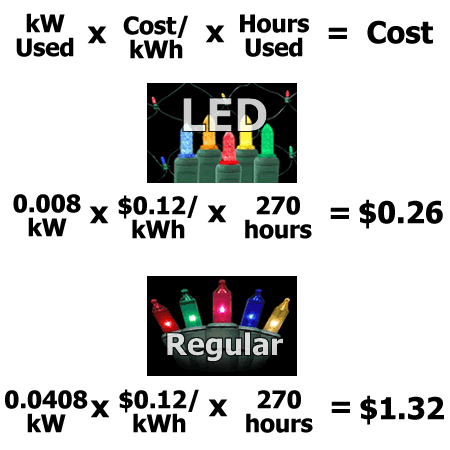
Amount of electricity used. Looking at the box of regular incandescent lights, they use 40.8 watts per 100 light strand (0.0408 kW). The 100-light strand of LEDs used 8 watts (0.008 kW). You should be able to find these on any box of lights, especially the traditional kind as they can draw too much current if you connect too many together.

Cost of electricity. Here is a link to the average cost of electricity by state. The nationwide average is 12 cents per kWh (kilowatt-hour), but can range from 9 cents in some states like West Virginia to 28 cents in Hawaii.

Time used. How many days x how many hours per day do you plan to run the lights. I figure 45 days from right before Thanksgiving until a little after New Years. From sunset to bedtime is about 6 hours. So that’s 45 days x 6 hours = 270 hours.

The Numbers

Conclusion

Using these numbers, it would be reasonable to say that each 100-light strand would save $1 in electricity per year. Costs will vary, but I saw a set of 100 of cheap incandescents for under $3 at the megastore, while the cheapest 100 LEDs cost closer to $12. The means it would take nearly a decade to break even on purely a electrical savings basis. Given my natural talent in creating tangles in these string lights, I don’t know if I can see them lasting that long. You definitely aren’t going to save the world by buying LED holiday lights.

If you already had a set of incandescents, I can’t imagine being able to justify throwing them out for a new set of LEDs, since even the LED lights are mostly made out of plastic and thus fossil fuels. Since we didn’t have any lights to start with, we just decided to buy a set of each (LED & old-school) to compare the “light quality”. The brightness of the two modern sets we bought were comparable, and look very similar from a distance.

Now, I’ve also seen the solar-powered LED light kits, but from the package they use less than 3 watts of energy, which means they are significantly dimmer. However, the lack of power plug does make it mighty convenient.

Cheap Cell Phone Plan With Unlimited Data: Virgin Mobile $35 w/ Android Phone

Update: As of 7/20, the plan is now $35 per month.

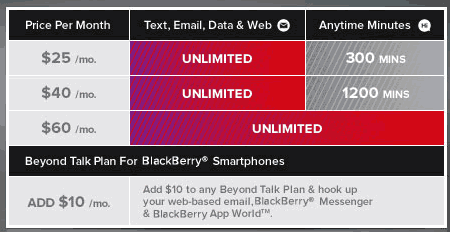
If you’re looking to trim your cell phone bill, but still love the idea of smartphone antics with unlimited data, this post is for you. While best known for their prepaid phones, Virgin Mobile also has a set of monthly recurring plans called Beyond Talk that starts at just $35 for 300 minutes and includes unlimited data.

Here are some more details of the plans:

  • No contract, no credit check, no activation fees.
  • Price includes all taxes and fees.
  • Virgin Mobile is owned by Sprint, and uses Sprint’s 3G network.
  • Unlimited text messaging and data (email, web browsing)
  • Additional minutes are 10¢ each. Sales tax and fees may apply.

Now, other brands like StraightTalk offer unlimited data with a very limited set of phones. But with Virgin Mobile, you can get Android OS phones like the LG Optimus V for $150 or the fancier Motorola Triumph for $300.

Price Comparison

Local taxes and fees add up to about $5 per line in my area, which makes the $35 basic plan comparable to a $30 plan from a conventional contract carrier. As long as you don’t need that many talk minutes, I would say this is a very flexible and affordable plan.

If you include the cost of the smartphone ($150) and 300 minutes service for a year, that comes up to 150 + 25×24 = $750 over two years. Extra minutes cost 10¢ each.

You can buy the LS Optimus S (for Sprint) from Sprint for only $20, but the cheapest plan with 500 minutes + unlimited data is at least $60 a month (not including taxes). That’s a total cost of 20 + 60×24 = $1,460 over two years + taxes. That a difference of over $700, or $350 a year, although you do get more minutes this way. Extra minutes cost 45¢ each. (*Excludes any employee or student discounts.)

Hat tip to Lazy Man for bringing it to my consciousness. For way too much information about Virgin Mobile plans and the Intercept in general, visit Howard Forums.