Follow-Up: Google VoiceMail Now Works With Sprint

Just a quick note that Sprint conditional call forwarding is now free of charge. This means that Sprint customers can now forward all busy and unanswered phone calls to Google Voice without incurring the previous $.20/minute for conditional call forwarding – normal minutes usage still applies. Thanks to reader Matt G for the reminder.

If you don’t know what I’m talking about, see last month’s post on Using Google Voice To Enhance Your Cell Phone Voicemail.

I’ve been using it for the last few days, and I must say that I like it a lot. I can have unanswered phone calls to my cell phone number (not GV number) forwarded first to my home phone or office phone. Then, if still nobody picks up the Google Voicemail system kicks in, which records the message online and shoots me a transcribed text message about 30 seconds later. Transcription accuracy isn’t perfect, but for the most part it works well enough to get the point of the message.

Check out my post on Ways To Save Money With Google Voice for several other useful features! They seem to be giving out invites to everyone who asks right now.


Costco Auto Buying Program Experiences?

After having some more issues with our 15-year old car, we may be in the market for a new or lightly used car. We were looking at the Honda Fit (the newest gen looks even better than the previous one), and went to a local dealer for a test drive. I actually sat down to haggle prices for a bit (stupid me) and after being lied to about four different times, I just got up and left.

I went home, and remembered the Costco Auto Buying Program that offered a no-haggle pre-negotiated price. Ideally in true Costco style, they would offer a “good” deal as opposed to a rock-bottom pitted-six-dealers-against-each-other-in-a-deathmatch price. I figured, why not give them a try?

I filled out the form, and the person calls me back. I was surprised to hear that he was an employee of Costco, not of the dealership. He gives me the spiel about how Costco is all about volume so he can offer a better price than a salesperson. However, it turns out that my Costco-affiliated dealership is the same one I went to for a test drive, and since I met with a salesperson they were not allowed to talk specifics with me for a period of at least 2 weeks after last contact. If I start up negotiations again, the date resets. I’m not in a hurry, so I’m just waiting around because the original guy definitely isn’t earning a commission from me.

Has anyone out there used this program before? How did you like it? I found this link which offered a mix of experiences.

Should I Buy This Gadget? Here’s a Helpful Flowchart

Click below or on the thumbnail above to see the whole thing.

[Read more…]

Swaptree Review: Barter Your Books, CDs, DVDs, and Video Games

I’ve spent the last few hours browsing on Swaptree, which is a website that allows you to swap your books, CDs, DVDs, and video games with other members. You just list the items that you want to trade and the items that you want, and Swaptree sets up trades for you. You can also view a big list of other things you could get in trade. If you see a swap you like, you just pay for shipping your items out, the site does not charge any fees. (It appears to be ad-supported.)

You can list items you want to trade quickly by entering the UPC or ISBN code on the item. Everything is one-for-one. For example, one book is traded for one video game. The site tries to create more possibilities by figuring out 3-way and even 4-way trades between members. Trust is gained by an eBay-like rating system. There is also a postage-printing service that makes it easy to make postage labels and drop your package off without waiting in lines.

I kind of view Swaptree as the $3 store:

  1. You list all your old books/CDs/DVDs/games you don’t want and aren’t using. Good weekend project.
  2. You now have a store in which everything is essentially priced at $2-$3, the cost of shipping your stuff out. Just listing a few books can offer up hundreds of options.
  3. If you want something specific, list it on your Want list so others have a greater opportunity to create a working swap.
  4. Be quick though, as some of the good items get snapped up fast!

I know, this doesn’t take into account the value of your media, but I would say this is best for things that have been sitting around for a while. Why list a bunch of items that might be worth a few bucks on eBay and be subject to $1 in eBay/PayPal fees, not to mention paying listing fees for each item that doesn’t sell.

You are allowed to ship via Media Mail, which is based on weight (ex. $3.16 for a 3 lb. package). However, if you ship in a padded envelope and it is under 9 ounces, shipping via First Class is both cheaper and faster.

Paradox Of Financial Choices: Maximizing vs. Satisficing

In the book Paradox of Choice by Barry Schwartz, he talks about how there are two types of people, maximizers and satisficers (think satisfy + suffice). I will simply quote the excellent summary from the book’s Wikipedia page:

A maximizer is like a perfectionist, someone who needs to be assured that their every purchase or decision was the best that could be made. The way a maximizer knows for certain is to consider all the alternatives they can imagine. This creates a psychologically daunting task, which can become even more daunting as the number of options increases. The alternative to maximizing is to be a satisficer. A satisficer has criteria and standards, but a satisficer is not worried about the possibility that there might be something better. Ultimately, Schwartz agrees with Simon’s conclusion, that satisficing is, in fact, the maximizing strategy.

If you can’t tell already after 10 seconds of reading this site, I am a hardcore maximizer. I love collecting data, poring over alternatives, finding out secret exceptions, all so I can choose the “best” choice. I prefer the term “good enough-er” to satisficer. For some people, the second it reaches the “good enough” stage, they are done and move on.

A Pathetic Maximizer Story
This happened just last week. A friend of mine comes over, and brings some McDonald’s with him. After he leaves, I go to throw out the garbage but notice an unpeeled Monopoly game piece. I peel it out of curiosity, but I get no instant-win and two random streets (St. James Place and Atlantic Avenue). But wait… I vaguely know that one of the rules of the game is that if you collect all the streets of a neighborhood (same color), you win a cash prize. However, some streets are given out all the time, while others are very rare. What if I had one of the rare pieces?

Of course, I then had to fire up the computer and search for the rare pieces. Lo and behold, Wikipedia also has a list of all the rare pieces. For example, Ventnor Avenue is also yellow like Atlantic, but is always the “missing” piece and thus essentially worth $25,000 by itself. My pieces were of course worthless. But I still had to know.

Maximizing and Investing
I began to think about how this relates to personal finance. In investing, you’d obviously like to maximize your returns. However, it is very difficult to know in advance which stock or mutual fund will outperform the rest. You could read books, financial statements, interview executives, or watch CNBC all day. You could listen to Warren Buffett’s every bowel movement and dissect all his annual shareholder letters for hints and tips.

Or if you’re like me, you may decide that even though the market isn’t perfectly efficient, it is still very efficient especially when costs like mutual fund fees, trade commissions, and tax considerations are taken into account. I now invest passively, and agree to be “satisficed” with the returns of the world markets minus costs. But even here, I am trying to maximize my returns by minimizing costs by buying Vanguard index funds or similar ETFs so that my portfolio costs less than 0.20% of assets annually.

Better to Satisfice?
The things I could maximize financially go on and on. From bank interest rates to cell phone plans, credit card reward structures to auto insurance premiums. Would I be happier if I just picked something “good enough” and moved on? Perhaps it is you readers that are the smartest, letting us slightly kooky bloggers do all the research for you, and then just picking what is good enough for you! 😉

Where maximizing hurts most is when it stops you from taking action. It doesn’t matter if your interest rate is 1.8% vs. 1.85% when your money is still stuck in a 0% checking account at some megabank. It doesn’t matter if you get the optimal 401k asset allocation if you’re not even contributing the most you can to the plan. For me, I have been putting off fixing up my house and adding solar hot water for several months because I want to find the “best” contractor. Meanwhile, I’m still using too much electricity and the tax breaks may expire.

Are there some things where you maximize, and others where you satisfice?

Interview: A Couple Spends A Year In Asia For $9/Day Each

This is a interview/guest post with blog reader Ariel Hoffman, who recently spent a year traveling around Asia with his girlfriend Michal with a combined budget of only $10,000 – and managed to come back with $3,500 of it! I love to read nonfiction travel essays, so not only are there some great frugal travel tips below, it was also very exciting to read about their adventures. Thanks again for sharing, Ariel!

What was your inspiration to go on this adventure?
In Israel, it is mandatory to serve in the armed forces for at least 3 years. After that you just want to get away, and Asia is the perfect destination for someone who’s just saved up 3 years worth of the army’s 100$-a-month salary. Also, Israel’s a pretty small country, so there isn’t much domestic travel to be had like there is in the US.

The itinerary my girlfriend (Michal) and I came up with was mostly about avoiding the rainy season, and minimizing air travel. Air travel is expensive and boring, and you try to avoid it if you have a lot of time to spend.

How did you come up with your budget? Did it end up costing more or less than you thought?
We sat down and did some serious homework, mostly on websites like lonelyplanet.com and their forums. The budget they offered sounded ridiculously low, so we nearly doubled everything we read about, and came up with a rough estimate of about 10,000$ for the two of us, for the entire year.

What we realized, however, is that not only were the estimates online pretty accurate, but also that two people don’t spend exactly twice as much as one – lots of things are shared (such as meals, transportation, hotel rooms etc.) and so it’s more like budgeting for a person and a half rather than two.
We were very pleasantly surprised when we came back home to count our remaining traveler’s cheques and see we still have about 3,500$ left over for next time!

How did you fund it? Did you save up the cash upfront, borrow some money, work while on the trip, or some other combination?
In preparation for our trip, we both took on extra work and saved up every Shekel we made. It took us about 5 months. Once we reached our goal of 10,000$, we exchanged all our cash into traveler’s cheques – a great way to keep your money both liquid and safe when abroad. Luckily for us, the exchange rates were in our favor the whole time, which gave our savings an extra 2%-5% throughout the journey.

Walk us through a typical day on your Year in Asia trip.
Most days would begin with trying to find breakfast – not always an easy task. Most Asian countries do not serve what we would consider breakfast, especially my vegetarian Michal. Although chicken porridge and spicy rice is very nice, it’s not everyone’s idea of the right way to start your day. After eating some novel type of cookie in spiced tea, we would set off to whatever National Monument/UNESCO World Heritage Site/Giant Temple/Yearly Festival was in the town on that day. After a day’s tour of the attraction we would start hunting for a suitable lunch, which meant looking around for a street stall with a good crowd, or a local restaurant with a queue. Nothing says fresh like a long line of customers, and Asian vendors normally close their stalls every day when they’ve exhausted all their stock, so food is never kept overnight and doesn’t have time to spoil. Another plus is that the food is not made of pre-cut ingredients, which makes preparation slower, but at least you see exactly what you’re getting so there are no surprises.

Evening was normally a time for sitting on the beach, going to some performance or sitting in some tea-shop with friends. For a while we had a small kitchen in our room, so I would cook dinner for us while Michal practiced yoga. In China we bought a Wii, and at night we’d plug it in and invite friends over for kart racing – it’s OK to enjoy modern fun even when on the road!
We spent a lot of time on trains and buses, getting from A to B. Sometimes as long as 27 hours! Israel’s longest train ride is only 4 hours long.

What are some basic money-saving tips you might offer us readers?
[Read more…]

Ways To Save Money With Google Voice

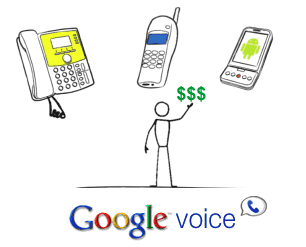
The telecom service Google Voice has been giving now new accounts faster recently, as well as now letting some current users invite others. I already have an account from back when it was GrandCentral, but I just requested an invite from Google and got an invite within 3 days.* Since it appears they are ready to open things up, I thought it might a good time to explore ways that this service can enhance your calling experience and even save you some money.

Calling Features

Google Voice provides you a free phone number, designed to be your primary number, which you can then link up with your existing phone numbers – work, home, and mobile. This About Page provides a nice round-up of the features of Google Voice. Here are the ones I’ve found most useful:

  • Ring All Phones. You can choose to ring all your phones when someone calls your GV number, and pick up any one of them.
  • Call Screening / Routing / Blocking. If the number is unknown to you, then they have to announce themselves and then you can decide whether to take the call or send it to voicemail. The caller never knows if you actually got the call. You can route specific callers to specific phones, or just block them so you never have to take their call.
  • Voicemail to Text. Voicemail messages are transcribed to text for free, and can also be sent to you via SMS text message. It’s not perfect, but you can usually get the gist of the message.

Money-Saving Features

One major way that Google Voice can save you money is by reducing the number of “peak” cell phone minutes you use, so that you can either drop down to the cheapest plan or even go prepaid if you’d like.

Ring All. Since all your phones ring, you can pick up your work phone or landline if it is more convenient, when usually people would just call your cell phone by default. This could reduce your minute usage more than you think.

Never Use Up Any Cell Minutes Using Calling Circles. Also known as T-Mobile MyFaves, Verizon Friends & Family, Sprint Pick3, and AT&T’s A-List. Simply add your GV# to these calling circle programs, and every incoming call can now be free. You’ll need to set the caller ID to show your GV#, and not the originating caller’s ID. However, since there is the screening option where every caller has to state their name, you can still find out who’s calling before answering.

Calling out can be free as well, if a bit more hassle. You can also dial out for free by calling your GV# first, press 2, and then enter the number you wish to dial. If you have internet access it’s easier, just click on the contact on GV website.

Free Long Distance From Landline. If you really want a POTS landline, you can now switch to the cheapest local plan with no long distance. When you want to dial long distance, just call your GV# and have it dial out from there. (If you don’t have a GV# within your local calling area, you must dial out using the internet.) Calls are free to US and Canada.

Free Text Messages. You can send and receive text messages through GV for free. This can be a bit of a hassle, but perhaps you have unlimited data but hate the idea of paying another $10 a month for text messages. (I mean, how are text messages not included under data??) With a data plan, just use your phone web browser or specific GV app for your phone.

Other Possible Uses

Extra Business Number. Instead of using it as your central number, use GV as an alternative number for your business venture, superhero alter ego, or whatever.

For Minimalists / Nomads. Even if you don’t have a landline, VoIP, or even a constant cell-phone, you can now get a phone permanent number. You can access your voicemails online, and call back when you feel like it. Some users have dropped everything except for a prepaid cell phone plan costing less than $10 per month.

Got more tips? Share them in the comments. Want a Google Voice account? Request an invitation here.

(*This is pure speculation, but I used a non-yahoo/gmail/hotmail “paid” e-mail and think it might get a faster response due to the people abusing things by trying to re-sell invites on eBay.)

Existing Sprint SERO Plan Upgrade Tips & Tricks

This post is targeted for those who have the grandfathered cell phone plan called the Sprint Employee Referral Offer (SERO) plan. This plan is no longer available to the general public, but for $30 a month it gave us 500 minutes per month, unlimited 7pm nights and weekends, unlimited text messages, and unlimited data.

Many of us love the plan, but it appears that Sprint really wants to phase us out, or at least upgrade us to their new Sprint Everything Plus Referral Program (EPRP)* where a similar plan costs $60. They are doing this by not allowing many newer phones to be activated on SERO, including the Samsung Instinct HD, Palm Pre, and HTC Hero (Android OS) phones. It seems like they will continue to ban all the best new phones. Here’s what I did to keep my $30 SERO plan and still get a relatively snazzy phone for a net cost of $130.

$70 Credit For Extending Contract By 2 Years
Do this first! Follow the abbreviated directions below exactly from user t-bob of SlickDeals. Do not call in. It will extend your contract by 2 years, but you’ll still be eligible for the $150 phone upgrade credit.

At 22 months you are eligible to renew your contract. When you are eligible, login to your account at sprint.com and click on the “contact us” link at the top right of the page in the black bar. Click on the “Email us” link. Search for something like “renew contract”. Now you should finally be at the web form to submit an email to Sprint eCare. For topic select “Plans, features, and services” and for subtopic select “Plan inquires.” In the text box say that you have heard that there is a $70 service credit available for renewing your contract and you would like to take advantage of that.

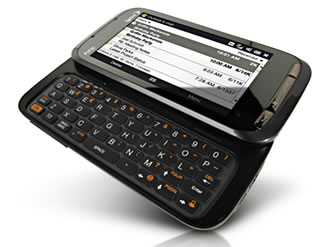
HTC Touch Pro2 for $199
You should get a reply within 24 hours that you can get the $70 credit. Verify online by checking that you now have a negative balance. Now, what’s the best phone that you can get to work with SERO? The answer in my opinion is the HTC Touch Pro2. Previously, the issue was that it cost $350 even after a $100 mail-in rebate. However, simply visit this link first, and then you’ll see the Touch Pro2 for only $199 on Sprint.com with no rebates. I thought it was just Sprint.com, but it was because I first saw this thread on Fatwallet. It checked out fine for me, and I already have my UPS tracking number.

Update 10/15/09 3pm Pacific: It appears this may no longer work on SERO plans. If you already got the $70 credit, you can either use eCare and tell them you changed your mind and have them reverse it, or you can wait to see if the price will drop again as the holidays near. Samsung Intrepid which runs Windows Mobile 6.5 is also available. Again, your contract will just shift to 2 years past your new purchase date.

You can read reviews of it here, here, and here. When you buy the phone, your contract will be extended again just slightly to 2 years after your purchase date.

It may not be the best phone out there now, but it does have a nice-looking touchscreen, a big physical keyboard, and access to a decent number of useful applications including Twitter, Facebook, Opera Mini, and Skyfire. All for $130 net. I can even tether it using PDANet and make it a wireless modem for my laptop, which I’ve been doing with my Motorola Q for the last 2+ years.

If you really want an iPhone or other specific phone and are willing to pay $30-$40 more per month for it, then I would say go for it because this plan won’t last forever. I’m just not ready to pay an additional $1,000 over the next 2 years just yet. 😀

* Russ.S.McGuire@Sprint.com / 383

Finding The Right Cables To Connect Laptop to TV

Like many others, I am thinking of ditching cable TV and the $500 to $1,000+ annual bill. You can find a lot of good online content now at sites like Hulu, FanCast, and OVGuide. Here is a quick guide to finding the right cables to connect your laptop or PC to your TV set, usually for less than $20.

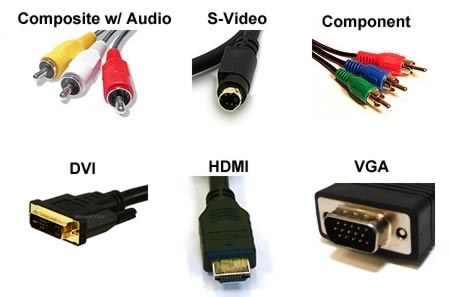
First up, a quick summary of the most popular types of video connections. Common computer outputs are VGA, S-Video, and DVI. Common TV inputs are RCA Composite, S-Video, Component, and HDMI. Keep in mind, you may also have to get the appropriate cables to set up audio.

The premier place to buy cheap cables has become Monoprice.com. Compare their prices to what Monster Cables at Best Buy cost, and prepare to weep at discovering what their markup percentages are like. Their shipping costs are also very reasonable.

VGA Out to Composite/S-Video
Many older laptops only output video via a VGA port. Some models support what is called “TV-Out” via their VGA port. If you are sure that your computer does this, then you can buy this cheap $2 VGA to S-Video/Composite adapter cable. This is related to RGB vs. NTSC.

Otherwise, you will need to buy this VGA to RCA Composite/S-Video Converter for $27. Still not bad for a one-time cost. This converter box will convert a VGA computer display signal into a composite (Yellow RCA) and/or S-video TV display signal.

S-Video Out
My old Dell Inspiron offers S-Video out, so I’m guessing a decent amount of other laptops do as well. This means all you need is a nice long S-Video cable, which costs a mere $1.70 for a 12-ft male/male cable.

DVI to HDMI
If you have a newer video card or a laptop like a MacBook, then there’s a good chance you have DVI out. Here is a 10ft DVI to HDMI cable for about $5.

(If you have mini-DVI, you’ll can get mini-DVI to DVI or mini-DVI to HDMI adapter for a lot cheaper than the Apple store!)

HDMI to HDMI
HDMI includes both video and audio data. Here is their HDMI cable category; scroll down to the cheaper (but good enough for most people) cables, as opposed to the Professional stuff. You can get a 10ft cable for less than $5.

1 Year’s Supply Of Food For $800 From Costco

Costco is selling an entire year’s supply of food for $800. That’s only $67 a month. Made by a company called Shelf Reliance, it’s all freeze-dried or dehydrated and is primarily marketed as emergency food (10-20 year shelf life). However, it also claims to taste pretty good, and they suggest to use it in rotation as a regular meal supplement.

The THRIVE 1 Year Food Supply comes complete with 78 #10 cans ranging 5 food groups: grains, fruits, veggies, meats & beans and dairy. With over 4,700 servings and many foods with a shelf life of up to 20 years, this package will give you variety, nutrition, and peace of mind. In addition to the high quality foods this package provides, a wheat grinder is included.

* 1 Year Food Supply for 1 Person
* 6 Month Food Supply for 2 People
* 3 Month Food Supply for 4 People
* Shipment arrives in 14 separate boxes
* Freeze-dried products have up to a 20 year shelf life if unopened
* Dehydrated products have up to a 10 year shelf life if unopened
* Simple rehydration instructions, recipes, and helpful tips on each can
* 4723 total servings
* Seventy-eight #10 cans
* Wheat Grinder included

I could not find any good in-depth reviews of how this product actually tastes and/or looks when prepared. Anyone out there try it before?

Creating a Completely Automated Financial Household

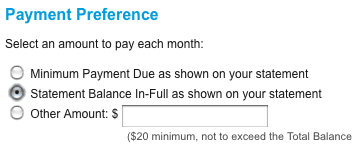
Meet Bill and Jan. They are my imaginary couple that loves putting their personal finances on auto-pilot. They don’t worry about bill due dates, they never visit the bank, and only check their balances online once a month if there are no e-mail alerts sent to them. (Apparently they also don’t have lips or eyes, so it works well for them…) Let’s take a look at how they do it!
Income
Bill and Jan both elected to receive their regular income via direct deposit, so there are no checks to deposit. Even though Jan does some freelancing, she gets paid via PayPal, which she sets to automatically sweep any money into their bank account at the end of each business day. This feature is called Auto Sweep and is not heavily advertised, you must contact PayPal directly to enable it.

Long-Term Savings
Like everyone else, their 401(k) plans are funded via an automatic deferral each payday. For their Roth IRA, they simply take out $500 per month via an automatic transfer from their checking account for 10 months, which can be set up easily at Vanguard.com or any other major mutual fund provider. If you like individual stocks or ETFs, try automatic investing at ShareBuilder.

Short-Term Savings
For their annual vacation and other savings goals, they have an automatic transfer from their checking to an online savings account like the original Capital One Consumer Bank.

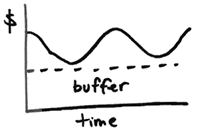
They do keep a certain buffer amount in their checking account, similar to this simple budgeting method. If the balance falls too low for any reason, an e-mail and text message alert are sent to both of them.

Housing
If they had a mortgage, most lenders will happily set up an automatic ACH from bank account each month. If they wanted to set up a biweekly payment plan and it isn’t free, they could simply take out 1/12th of their monthly mortgage payment each month automatically into Capital One 360. Once a year, they send one full mortgage payment to their lender.

If they rented, they would set their Online Billpay service to send a snail-mail check automatically each month and deduct the amount from the bank account.

Utilities
Most utility companies will allow to you sign up for them to automatically withdraw the full bill amount from your bank account. Contact them directly, and when available use your credit card to earn some extra rewards.

Insurance
Instead of dealing with large payments either annually or semi-annually, they have signed up for State Farm Payment Plan (SFPP), which groups their insurance premiums and divides them into one single monthly payment which is taken from their bank account. Check with your insurer to see if they have something similar.

Credit Card Bills
Most large credit cards issuers allow you to sign up a service like Citi’s AutoPay, where you can have the full amount sucked out of your bank account each month. Since the Citi Forward Card gives you 5x rewards on restaurants and Amazon.com, this most of their disposable income as well. To find it, go to CitiCards.com> (Login) > Payments Tab > Enroll in AutoPay.

What else?
With all this set up, all Bill and Jan have to do is show up for work and spend their money wisely. Is there anything else that could make their life even more easy? I thought about using an online grocery store like Peapod, where you can access past orders and possibly create default orders which you only tweak slightly each month.

The High Price of Cheap Food? Nutrition vs. Cost

In the doctor’s office, I saw the cover article of a recent issue of Time magazine was Getting Real About the High Price of Cheap Food. Inside were some interesting facts. For one, people in the U.S. actually spend less on food now than 30 years ago:

For all the grumbling you do about your weekly grocery bill, the fact is you’ve never had it so good, at least in terms of what you pay for every calorie you eat. According to the USDA, Americans spend less than 10% of their incomes on food, down from 18% in 1966. Those savings begin with the remarkable success of one crop: corn. Corn is king on the American farm, with production passing 12 billion bu. annually, up from 4 billion bu. as recently as 1970. When we eat a cheeseburger, a Chicken McNugget, or drink soda, we’re eating the corn that grows on vast, monocrop fields in Midwestern states like Iowa.

I was most concerned with the actual nutritional value we get from our food. If you look at calories vs. cost, again we see that the foods with the most nutritional value cost the most. This is similar to my popular post exploring What Does 200 Calories Cost?, which found bread and pasta on the cheap end, and fresh fruits and vegetables on the expensive end.

Result: The cheap and filling food has way too many empty calories.

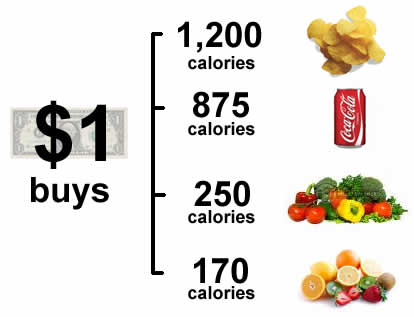
A study in the American Journal of Clinical Nutrition found that a dollar could buy 1,200 calories of potato chips or 875 calories of soda but just 250 calories of vegetables or 170 calories of fresh fruit. With the backing of the government, farmers are producing more calories — some 500 more per person per day since the 1970s — but too many are unhealthy calories. Given that, it’s no surprise we’re so fat; it simply costs too much to be thin.

So what is there to do? The Time article suggests that organic is one way to go:

Organic food continues to cost on average several times more than its conventional counterparts, and no one goes to farmers’ markets for bargains. But not all costs can be measured by a price tag. Once you factor in crop subsidies, ecological damage and what we pay in health-care bills after our fatty, sugary diet makes us sick, conventionally produced food looks a lot pricier.

Personally, I think we should start with finding the foods that provide the best balance between cost and nutrition. I’m still learning, but am trying to incorporate things like lentils, beans, and whole grains into my white-bread-and-rice world. Also, we’ve started buying a “box of vegetables” from a local organic farm (see Community Supported Agriculture). We don’t get to choose what goes in the box and are thus forced to be creative, but on a per-pound basis it costs less than half what a grocery store would charge for non-organic equivalents.